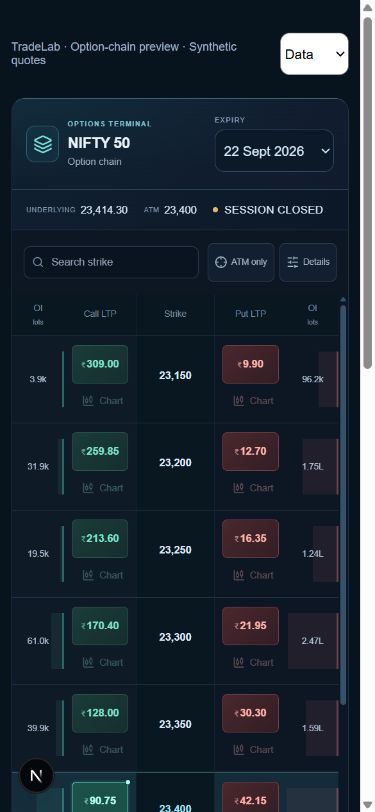
1. Separate the index, strike and premium
The index value describes the underlying market. A strike is part of an option contract’s identity. The premium is the price of that option. For example, a hypothetical 23,000-strike call could have a ₹100 premium; those numbers describe different things. When an option-order control asks for a premium price, entering an index level instead describes a completely different order condition. Read the control’s label before using it.
2. Choose the mode and check the data
Open the TradeLab workspace and select live paper practice or an available replay session. Check the quote status and timestamp. A closed session, delayed quote or missing recording can limit what you can practise. The page clock does not certify that quotes are fresh. Replay uses a separate virtual account and only the data available for that recording.
3. Identify the complete contract
In Options Chain, choose NIFTY 50 and an available expiry. Read the strike and CE/PE side together. Use the strike search or ATM filter to narrow the view. A call and put at the same strike are different contracts, and the same strike in two expiries is also different. Match the chart title and order ticket to the contract you intended. Do not substitute a different contract simply because one has no quote.
4. Check the lot size and quantity
Read the lot size for that selected contract. Total units = units per lot × number of lots. Contract specifications can change, so a remembered or sample lot size is not reliable for a current contract. Our examples use 50 units only to keep the arithmetic readable; they do not state the present NIFTY lot size. Verify the quantity on the confirmation and in the resulting position.
5. Write one hypothetical plan
For a bought-option example, entry ₹100, stop ₹80, target ₹140 and 50 units imply a planned loss of ₹1,000 and target profit of ₹2,000 before costs. Estimated costs of ₹100 change those amounts to ₹1,100 and ₹1,900. These are calculations for a made-up scenario, not levels to trade. A stop is a trigger condition, not a guarantee that the final loss will equal the plan. Use the risk–reward and position-size tools to see how your own hypothetical inputs relate.
6. Review and follow the paper order
Create an account or log in, then review the selected contract, side, quantity and order type in the workspace. Submit only after you can explain the fields. Check Orders for the server-recorded state. An order waiting for its condition and a filled position are different states. Use Positions to confirm the filled quantity and average premium, rather than assuming that clicking a button created the expected position.
7. Confirm changes to stops and targets
Where protection controls are available, use the option premium expected by the field. After adding or moving a stop or target, confirm that the change was accepted and appears in the order state. A drawn line alone does not prove that an instruction was saved. If an execution differs from the marked level, compare the timestamps, received quotes and recorded fill; snapshots may miss price movements between updates.
8. Review before the next session
Compare the entry, exit, quantity, costs and realised result in your paper records. Write down the assumption you began with, whether you followed your plan and one thing to improve. If something looks inconsistent, keep the order ID, contract, mode and time for a support ticket. Avoid sharing passwords or broker tokens. A profitable simulated trade does not establish how a real order would fill or whether a strategy will work.
Common questions
Do I trade the NIFTY index number itself in the option ticket?+
The option ticket refers to the selected option contract. Its premium, strike and underlying index value are distinct. Read the field label and contract identity.
Can I follow this on mobile?+
Yes. The app provides a mobile option-chain layout and paper-order controls. Available quotes and recordings still determine what can be shown.
Can I practise at night or on a holiday?+
Choose an available replay recording. Do not treat unchanged live-market quotes as a new live session.
Will an option stop always fill at its marked price?+
No. A trigger and a fill are different. Feed timing, gaps, liquidity assumptions and simulation rules can affect the recorded execution.
Try the numbers yourself
Explore a hypothetical scenario in our free calculator.
Risk & reward →Further reading
References explain general concepts. They do not endorse TradeLab or its simulations.